已測試出Microsoft AppLocale在 WIN10-64bit 安裝及使用方式+修正 Microsoft AppLocale 後的 pAppLocale.msi 下載
發布於2011-06-17 09:38
最佳答案
可以用apploc,我就在用,我是win10-64bit home basic。你可以試試「南極星」
追問
你怎麼安裝的?我安裝了半天也不成啊。
追答
追問
沒有什麼用,跟我那個一樣。安裝到最後一個下一步就要求我退出,郁悶。
哈哈,我剛弄好,這個方式絕對好使!
1、打開「任務管理器」(工作管理員) (我第一次用本本win10都沒找到 方法是ctrl+alt+del)
2、選擇進程,左下角「顯示所有用戶的進程」(更多詳細資料)前面(箭頭)打上勾
3、左上角「文件」(檔案)下拉菜單找到「新建任務」(執行新工作)單擊
4、在彈出的「創建新任務(建立新工作)」窗口中找到「瀏覽」單擊
5、右下角的「程序」(程式)下拉菜單選中「所有文件」(所有檔案)
6、找到「apploc.msi」這個文件單擊「打開」(開啟)
7、勾上 「利用管理員特權創建此任務」(以系統管理員身份建立此工作) 單擊「確定」
8、安裝完畢
已測試出Microsoft AppLocale在 Win8 安裝及使用方式
1. 安裝前先設定程式的相容性,設定成以前 Windows 的版本來安裝,
最好把 UAC 也關掉,安裝過程就可以成功。
2. 安裝好後 c:\Windows\AppPatch\AppLoc.exe 的屬性要設定成"以系統管理員身分執行"。
如此應該就可以大功告成!
剛剛發現其實Win8解決亂碼不用用到AppLoc
只要在系統安裝會產生亂碼的那個程式所屬語言套件就好了
在 win10 中 Applocale 已不適用,試試 ntleas046_x64 看看!!
修正 Microsoft AppLocale 後的 pAppLocale.msi 下載
作者 http://ntu.csie.org/~piaip/index.html
下載 直接 Download pAppLocale.msi
大小 1.32 MB
MD5: 88CF204C81202EF457DC12F7B02D859C
SHA-1: B2128CD080E4994747550D8C3736D7444F73B788
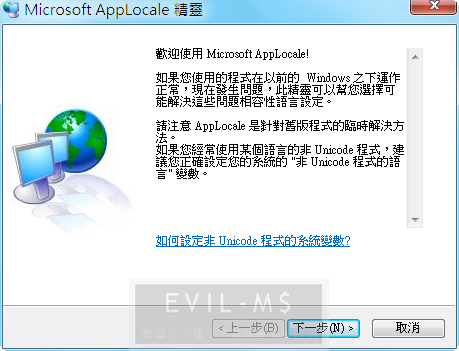
一般而言,遇到非 Unicode 程式執行時,介面或語言會出現亂碼,安裝 Microsoft AppLocale 公用程式 即可
但是 Microsoft AppLocale 微軟官方的 Bug 也不少,例如 "AppLoc.tmp" ,所以需要安裝修正 AppLocale 後的 pAppLocale.msi,作者說明如下Microsoft AppLocale, 出名的切換語系工具, 不過它有很多問題,包括你裝了後 MSI Installer 都會用 上次設定的語系跑等等。
我修正了 AppLocale , 改為 pAppLocale, 除了修正 bug 外還讓你建捷徑後執行的程式不會再跑對話窗煩你。
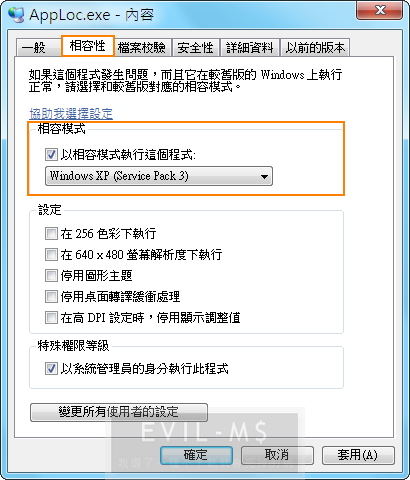
Windows Vista / Windows 7 請用相容性執行
ZEGii's Sharea: 原創分享 - MicrosoftApplocale Rightkey
使用 AppLocale 時每次都要按
開始 > 程式集 > Microsoft AppLocale > AppLocale.exe
須時費久~ 因此小弟將之簡單整合於右鍵內, 既美觀又方便
只須執行以下 .reg 檔便可以
各內容如下:
日本語執行.reg
簡體中文執行.reg
= = = = = = = Extra = = = = = = =
繁體中文執行.reg
韓國語執行.reg
PS. 補充刪除regedit 繁體中文執行Microsoft AppLocale.reg 的方式
下載 直接 Download pAppLocale.msi
大小 1.32 MB
MD5: 88CF204C81202EF457DC12F7B02D859C
SHA-1: B2128CD080E4994747550D8C3736D7444F73B788
一般而言,遇到非 Unicode 程式執行時,介面或語言會出現亂碼,安裝 Microsoft AppLocale 公用程式 即可
但是 Microsoft AppLocale 微軟官方的 Bug 也不少,例如 "AppLoc.tmp" ,所以需要安裝修正 AppLocale 後的 pAppLocale.msi,作者說明如下Microsoft AppLocale, 出名的切換語系工具, 不過它有很多問題,包括你裝了後 MSI Installer 都會用 上次設定的語系跑等等。
我修正了 AppLocale , 改為 pAppLocale, 除了修正 bug 外還讓你建捷徑後執行的程式不會再跑對話窗煩你。
Windows Vista / Windows 7 請用相容性執行
ZEGii's Sharea: 原創分享 - MicrosoftApplocale Rightkey
使用 AppLocale 時每次都要按
開始 > 程式集 > Microsoft AppLocale > AppLocale.exe
須時費久~ 因此小弟將之簡單整合於右鍵內, 既美觀又方便
只須執行以下 .reg 檔便可以
各內容如下:
日本語執行.reg
Windows Registry Editor Version 5.00
[HKEY_CLASSES_ROOT\exefile\shell\日本語執行]
[HKEY_CLASSES_ROOT\exefile\shell\日本語執行\command]
@="C:\\WINDOWS\\AppPatch\\AppLoc.exe \"%1\" \"/L0411\""簡體中文執行.reg
Windows Registry Editor Version 5.00
[HKEY_CLASSES_ROOT\exefile\shell\簡體中文執行]
[HKEY_CLASSES_ROOT\exefile\shell\簡體中文執行\command]
@="C:\\WINDOWS\\AppPatch\\AppLoc.exe \"%1\" \"/L0804\""= = = = = = = Extra = = = = = = =
繁體中文執行.reg
Windows Registry Editor Version 5.00
[HKEY_CLASSES_ROOT\exefile\shell\繁體中文執行]
[HKEY_CLASSES_ROOT\exefile\shell\繁體中文執行\command]
@="C:\\WINDOWS\\AppPatch\\AppLoc.exe \"%1\" \"/L0404\""韓國語執行.reg
Windows Registry Editor Version 5.00
[HKEY_CLASSES_ROOT\exefile\shell\韓國語執行]
[HKEY_CLASSES_ROOT\exefile\shell\韓國語執行\command]
@="C:\\WINDOWS\\AppPatch\\AppLoc.exe \"%1\" \"/L0412\""PS. 補充刪除regedit 繁體中文執行Microsoft AppLocale.reg 的方式
[-HKEY_CLASSES_ROOT\exefile\shell\繁體中文執行]
[-HKEY_CLASSES_ROOT\exefile\shell\繁體中文執行\command]
文章標籤
全站熱搜

右鍵快捷無效@@
Internet Download Manager or IDM is one of the most powerful and top rated software. It allows users to download all types of files automatically with 5x speed. That’s why millions of Internet user are using this software. But you need IDM serial number to register because without registration; you cannot use a long time. You will get 30 days trial version of Internet download manager. There are many free ways to register this software, but we always recommend to buy the idm application. https://osproductkey.com/idm-crack-serial-key/
https://osproductkey.com/idm-crack-serial-key/
Internet Download Manager, also known as IDM, is software used to manage and schedule downloads from the Internet. It was developed by an American company called Telephone Ink to help users download and manage files on the Windows operating system. It is only compatible with Windows OS, such as Windows 7, Windows 8, Windows 10, etc., and it is one of the best user reviews. You can use the free 30-day version initially or get the IDM serial key to access all features. https://procrackbox.com/idm-crack-universal-patch-2019/
Have you ever been downloading a video or a movie you have been waiting to watch eagerly, and it stopped downloading in between? Then, you had to restart downloading it from the beginning? Or, you wished you could download a video easily from YouTube, but you couldn’t? These are the common problems faced by people all over the world. But what is the solution? IDM comes to your rescue. As you go on reading further, you will come to know about IDM Serial Key, its features, and how to use it to increase the speed of your internet. IDM stands for Internet Download Manager. Developed by the American company named Tonec Inc., IDM is a software that helps you plan, manage and download content such as movies, videos, documents, and even YouTube videos from the internet at high speed. The tool is also utilized in scheduling downloads and ensuring that they resume when computer functions are interrupted. IDM is one among the best download manager for Windows and is compatible with Windows OS like Windows 7, Windows 8, Windows 10, Vista, etc.; you can initially use the thirty days a free trial pack of IDM or can buy IDM serial key and enjoy downloading. https://activationkeys.org/internet-download-manager-key/
Internet Download Manager (IDM) is an excellent software that helps you quickly plan, manage and download various content from the Internet. This could be documents, TV shows, movies or YouTube videos. You can download them all using IDM. https://activationkeys.org/idm-key-patch/
Your writing is superb. Go ahead and do it! Thank you for a terrific work.